
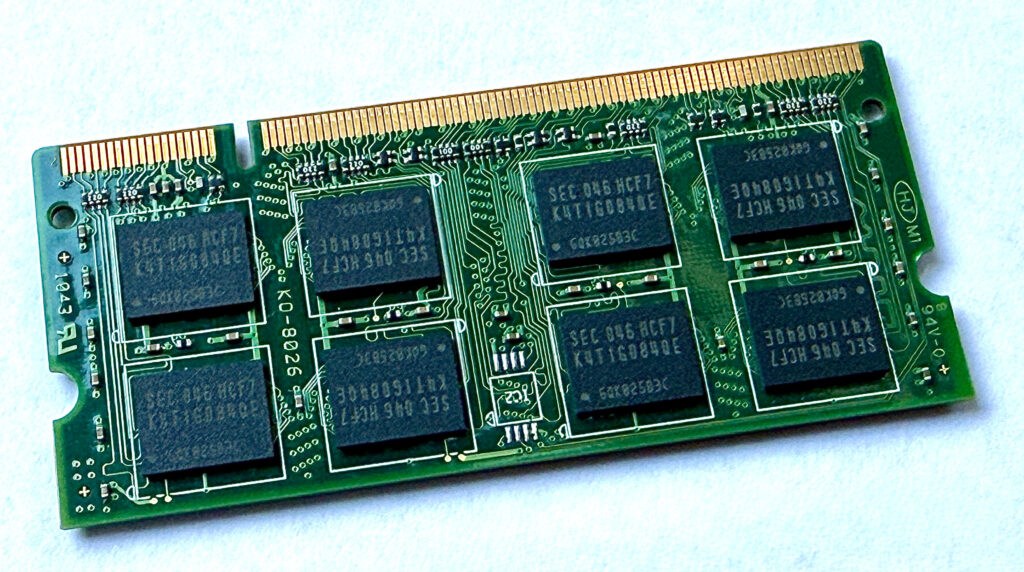
RAM, or Random Access Memory, is your computer’s short-term working memory. It holds the data and programs your system is actively using so the processor can access them quickly. When you open a web browser, edit a document, stream a video, or play a game, RAM stores the information needed right now. There are various types of RAM used in laptops or desktops. This article provides a basic understanding of RAM and its types to help readers make a wise decision with their computer purchase.
Unlike a hard drive or SSD, RAM is temporary. It keeps data only while the computer is powered on. When you shut the system down, the contents of RAM are cleared.
Why RAM Matters?
RAM helps your computer run programs smoothly and switch between tasks quickly. The more RAM you have, the more things your computer can usually handle at once without slowing down.
If your system does not have enough RAM, it may start using storage space on the SSD or hard drive as backup memory. That works, but it is much slower, which is why a computer can feel sluggish when too many apps are open.
Types of RAM
There are several types of RAM, and each type, along with its subtypes, offers distinct advantages suited to different needs.
DRAM
DRAM, or Dynamic Random Access Memory, is the most common type of RAM used as the main memory in desktop and laptop computers.
- Relatively affordable.
- Can store a large amount of data.
- Needs to be refreshed constantly to keep its data. This is because each bit of information in DRAM is stored in a tiny cell that slowly loses its electrical charge over time. The computer has to repeatedly recharge those cells many times every second so the stored data does not fade away.
Most of the memory installed in everyday computers is a form of DRAM.
SRAM
SRAM, or Static Random Access Memory, is much faster than DRAM, but it is also more expensive and takes up more space.
- Does not need constant refreshing in the same way DRAM does.
- Used where speed is especially important.
- It is commonly used for CPU cache rather than main system memory.
In simple terms, SRAM is faster, but DRAM is cheaper and better for larger amounts of memory.
SDRAM
SDRAM, or Synchronous Dynamic Random Access Memory, is a type of DRAM that works in sync with the system clock. This helps performance because the memory and the rest of the system can coordinate their actions more predictably. In simple terms, requests and data transfers happen in a more organized rhythm, which improves efficiency compared with older asynchronous memory designs.
DDR SDRAM
The most familiar modern RAM types belong to the DDR SDRAM family. DDR stands for Double Data Rate, which means it can transfer data more efficiently than earlier memory designs.
Why data rate matters
Data rate is important because it affects how quickly information can move between the RAM and the rest of the system. A higher data rate means the memory can send and receive more data in the same amount of time. In simple terms, this helps the computer keep up better when running programs, switching between tasks, loading large files, or handling demanding work.
How DDR helps
DDR helps by moving data on both parts of each clock cycle instead of just one. A clock cycle has two edges, and older SDR memory transferred data on only one of them. DDR transfers data on both edges, which is why it is called “double” data rate. That allows the memory to do more work without needing the clock speed to increase in the same way. For everyday users, the main idea is that DDR improves the efficiency of memory transfers, which helps modern computers feel faster and more capable.
Understanding RAM speed labels
You will also often see RAM described with a speed label such as DDR3-1600, DDR4-3200, or DDR5-5600. The number usually refers to the memory’s data rate, often measured in MT/s (million transfers per second). In simple terms, a bigger number usually means the RAM can move more data per second.
For example:
- DDR3-1600 is slower than DDR4-3200
- DDR4-3200 is slower than DDR5-5600
That does not always mean a computer with the higher number will feel twice as fast, because overall performance also depends on the processor, storage, cooling, and how much RAM the system has. Still, RAM speed is useful when comparing similar laptops, especially if they have the same CPU and the same amount of memory.
Common DDR generations
Common DDR generations include:
- DDR3: An older standard found in aging desktops and laptops.
- DDR4: A very common standard in many current computers.
- DDR5: A newer and faster standard that offers better bandwidth and improved efficiency, but requires compatible hardware.
Each DDR generation is different, and they are generally not interchangeable. A motherboard designed for DDR4, for example, cannot use DDR5 memory.
Specialized Types of RAM
Some types of RAM are built for specific devices or workloads, so their characteristics are designed to match the needs of those devices or applications.
LPDDR
LPDDR, or Low Power DDR, is commonly used in smartphones, tablets, and thin laptops.
- Designed to use less power.
- Helps improve battery life.
- It is often used in compact devices where efficiency matters more than easy upgrades.
Newer versions include:
- LPDDR4X: A power-efficient version commonly used in phones, tablets, and lightweight laptops.
- LPDDR5: Faster than LPDDR4X and designed for newer mobile devices that need better speed for gaming, cameras, and AI features.
- LPDDR5X: An improved version of LPDDR5 that offers even higher speeds and better efficiency. It is often found in premium smartphones, tablets, and newer thin-and-light laptops.
GDDR
GDDR, or Graphics Double Data Rate memory, is used in graphics cards.
- Optimized for handling large amounts of visual data.
- Well suited for gaming, 3D rendering, and video processing.
- Built for graphics workloads rather than general system memory use.
Newer graphics memory versions include:
- GDDR5: Older but still found in some graphics cards.
- GDDR6: Common in many modern GPUs and faster than GDDR5.
- GDDR6X: An even faster version used in some high-end graphics cards for demanding gaming and content creation workloads.
HBM
HBM, or High Bandwidth Memory, is not the kind of RAM you would usually find in ordinary laptops. Instead, it is a newer and more specialized type of memory used in very high-performance graphics cards, AI accelerators, and supercomputers.
- Designed to provide extremely high memory bandwidth.
- Stacked in a compact design close to the processor or GPU.
- Usually used in expensive, high-performance hardware rather than ordinary PCs.
Common versions include HBM2, HBM2E, and HBM3, with each generation improving speed and capacity.
ECC RAM
ECC RAM, or Error-Correcting Code RAM, is often used in servers and workstations.
- Can detect and correct certain kinds of memory errors.
- Improves reliability.
- Especially useful in systems where stability is more important than cost.
RAM Form Factors
Besides RAM type, there is also the idea of form factor. A form factor is the physical shape and size of the memory module, along with the way it fits into a computer.
This matters because even if two memory sticks are both DDR5, they may not physically fit into the same machine.
DIMM
DIMM, or Dual Inline Memory Module, is the standard RAM stick used in most desktop computers.
- Larger than laptop memory.
- Usually easy to replace or upgrade.
- It is the form factor most desktop buyers will see when shopping for RAM.
Some DIMM-related terms you may also come across are:
- UDIMM: This stands for Unbuffered DIMM. It is the most common type of desktop memory used in regular consumer PCs. For most buyers, when a desktop listing simply says it uses standard DDR4 or DDR5 RAM, it usually means UDIMM memory.
- CUDIMM: This stands for Clocked Unbuffered DIMM. It is a newer DIMM type designed to help maintain signal quality at higher DDR5 speeds. In simple terms, it is aimed at newer systems that want faster memory while keeping good stability. Buyers only need to care about CUDIMM if they are shopping for a newer desktop platform that specifically supports it.
- RDIMM: This stands for Registered DIMM. It is mainly used in servers and professional workstations, where stability and support for large memory capacities matter more than consumer-friendly upgrade options.
SO-DIMM
SO-DIMM, or Small Outline DIMM, is a smaller form factor commonly used in laptops and mini PCs.
- It takes up less space than a full-size DIMM.
- It is often used in upgradeable laptops.
- Desktop DIMMs and laptop SO-DIMMs are not interchangeable.
Soldered RAM
Some thin laptops, tablets, and compact devices do not use removable RAM sticks at all. Instead, the RAM is soldered directly onto the motherboard.
- This saves space.
- It can help with power efficiency and slim device designs.
- It usually means the RAM cannot be upgraded later.
This is very common with devices that use LPDDR memory, including systems with LPDDR5 or LPDDR5X.
RDIMM and LRDIMM
In servers and some professional workstations, you may see form factors such as RDIMM and LRDIMM.
- RDIMM stands for Registered DIMM.
- LRDIMM stands for Load-Reduced DIMM.
- These are designed for large memory capacities and better stability in server systems.
They are generally not something the average home computer buyer needs to worry about unless shopping for a workstation or server.
Quick comparison table
| Form factor | Commonly found in | Replaceable? | Should buyers care? |
|---|---|---|---|
| DIMM | Desktop PCs | Usually yes | Yes, mainly to confirm compatibility and upgrade options |
| SO-DIMM | Laptops and mini PCs | Often yes | Yes, especially if you may want to upgrade later |
| Soldered RAM | Thin laptops, tablets, compact devices | Usually no | Yes, because you normally cannot upgrade it after purchase |
| RDIMM / LRDIMM | Servers and some workstations | Yes, but only in supported systems | Usually only if buying a server or professional workstation |
Do Computer Buyers Need to Care?
Yes, but only at a basic level. Most buyers do not need to memorize every RAM standard, but they do need to pay attention to a few practical things:
- Desktop or laptop: Desktops usually use DIMMs. Laptops usually use SO-DIMMs or soldered memory.
- Upgradeable or not: Some laptops let you upgrade RAM later, while others have soldered RAM that cannot be changed.
- DDR generation: The system must support the right type, such as DDR4 or DDR5.
- Capacity: Decide how much RAM you need, such as 8 GB, 16 GB, or more. We have a good article to help you decide your needs here – How much RAM do I need.
- Special-purpose memory: If you are buying a gaming PC, the graphics card may use GDDR. If you are buying a server or workstation, you may need ECC RAM or RDIMMs.
Summary
- RAM helps your computer handle active tasks quickly.
- More RAM usually improves multitasking.
- DRAM is the main memory in most computers.
- SRAM is faster and used mainly for cache.
- DDR3, DDR4, and DDR5 are common generations of modern system RAM.
- LPDDR4X, LPDDR5, and LPDDR5X are newer low-power RAM types used in phones and thin laptops.
- GDDR5, GDDR6, and GDDR6X are used in graphics cards.
- HBM is used in high-end GPUs and AI hardware.
- ECC RAM is used in systems that need extra reliability.
- DIMM is common in desktops, while SO-DIMM is common in laptops.
- Soldered RAM cannot usually be upgraded later.
Final Thought
For most users, RAM is one of the key parts that affects how responsive a computer feels. You do not need deep technical knowledge to understand the basics: RAM is the fast workspace your computer uses to get things done, and different types of RAM exist because desktops, laptops, phones, servers, graphics cards, and AI systems all have different needs.